APPLIED AI · PLATFORM ENGINEERING · MODERNIZATION

Rong Gu

I turn operational complexity into dependable software, with a current focus on applied AI.

Architecture · applied AI · AI-enabled delivery · legacy-to-modern · Vancouver, BC, Canada

CAREER TIMELINE — OPEN A ROLE TO SEE SELECTED WORK
2013 CURRENT
Enterprise Software Company — Senior Software Engineer, Applied AI expand ▾ collapse ▴
Vancouver, BC · Dec 2013 — present
Backend architecture, API and framework design, and applied AI for transportation-management software. I use tools such as Cursor, Claude, and Codex to speed up research, prototyping, and delivery—while keeping engineering judgment, verification, and accountability with people. Most of what follows was built with — and handed to — the teams that own it today.
AI DELIVERY Loop engineering — the step past prompting Built TaskFlow on that idea — an internal tool where a stated goal moves through spec, implementation, test and review on its own, and I am asked for a decision rather than for the next prompt.

Most people meet Cursor as an IDE and drive it by prompting: describe, review, correct, repeat. Working one level down, against the SDK, the constraint looks different — the limit is not how well any single prompt is written, it is that a person has to stand in the gap between every step. Better prompts and skills shorten the steps; they do not remove the gaps. So I took the problem apart from the bottom: the prompt, then the context each role is given, then the harness it runs inside, and finally the loop that connects them — who hands to whom, what must travel with the handoff, and what each role is forbidden to do. The last layer was where the leverage was, and it is the one nobody was building.

PROMPT
Better instructions make each step better. A person still has to trigger the next one.
CONTEXT
Each role gets its own model and its own isolated context, so the agent writing a spec is not carrying implementation detail it should never see.
HARNESS
Rather than rebuild the runtime, every agent is a real Cursor agent session driven through the SDK — installed skills and MCP servers work unchanged, and upstream releases arrive for free.
LOOP
The missing layer: typed handoffs between roles, permissions fenced so a role cannot skip ahead, and agents that book a wake-up instead of going idle. This is where the human stops being the scheduler.

IMPACT Built TaskFlow on that idea — an internal tool where a stated goal moves through spec, implementation, test and review on its own, and I am asked for a decision rather than for the next prompt.

PRODUCT The next-generation product — designed, not ported The dashboard reached a feature-complete production candidate and the planning module closed a visible gap quickly enough to put in front of customers — neither of them a replica of the screen it replaced. The AI introduced alongside them is the starting point the product’s later AI work builds from.

The web product is the next generation of a desktop system that has been running in the field for decades, and the easy version of that project is a port: rebuild each Windows screen in a browser and ship it. That produces something users recognise and nobody is excited by. I joined with no prior time in the product, and within six months had designed and shipped a map-first live operations dashboard and then led the design and build of a new dispatch planning module — neither of which existed on the desktop in that form. The judgment that mattered was which capabilities deserve to be carried forward, which habits are worth breaking, and where new technology genuinely changes what a screen can be.

DESIGNED, NOT PORTED
Every desktop screen could have been rebuilt one-for-one — that version ships sooner and is dated the day it lands. The judgment that mattered came before any code: who is at the screen, what they reach for first, and which habits of the old pages were worth breaking. AI compressed the distance between an idea and something you can react to, so that design work and the build stopped being separate phases.
THE DASHBOARD
One live workspace in place of years of static grid pages: GPU-accelerated density maps, animated route trails, and progressive loading that surfaces useful data in 1–2 seconds while up to 5,000 records stream in. Seventeen reusable resource modules mean a future view needs no changes to the existing ones.
DISPATCH PLANNING
Led the design and build of a new planning module, taking it from a described need to a working part of the product.
SPEED IS PART OF THE DESIGN
The 1–2 second target was not an optimization pass afterwards — it decided whether the screen was worth building at all. Past a certain latency a live operations view degrades into another grid page, so the loading strategy was designed alongside the layout, not bolted onto it.
AI THAT SURVIVES CONTACT WITH A PRODUCT
Almost anyone can get AI to produce something impressive in an afternoon. The work is judging which of those capabilities survives contact with a product — what is reliable enough to put in front of a dispatcher paid to be fast, what degrades safely when it is wrong, and what has to stay under human control. I build the demo to find that out, then build the product on whatever held up. It is also why I put AI in while the product had none: it set where AI sits here and what it is allowed to decide.

IMPACT The dashboard reached a feature-complete production candidate and the planning module closed a visible gap quickly enough to put in front of customers — neither of them a replica of the screen it replaced. The AI introduced alongside them is the starting point the product’s later AI work builds from.

AI Multi-agent invoice validation — the prototype was the spec Reviews an order in 3–5 seconds, more than 95% faster than manual review; capstone score 98%. Just as important, almost nothing had to be thrown away between the prototype and a version fit to ship.

Invoice review was slow and uneven because the rules lived in prose and in people’s heads rather than in any rule engine. Instead of opening with a specification, I built something that ran — assembled on the APIs the shipped release already exposed — and put it in front of the people doing the work. Arguing with a running system is far more productive than reviewing a document: requirements arrived as corrections to actual output. And because it stood on shipped APIs rather than scaffolding, the distance from that prototype to a first production version was short. That is the part I care about — a prototype nobody can productize is just a demo.

THE PAIN POINT
Order and invoice rules were written in prose and carried by experienced staff. Checking them was manual, slow, and inconsistent between reviewers.
NO RULE-ENGINE DSL
The agents read the business rules as plain language. Changing a rule is editing a sentence, not shipping a release — which is what let the rules keep moving while the product was still being defined.
BUILT ON SHIPPED APIS
The prototype called the same APIs the released product already exposes. Nothing had to be rebuilt to make it real, so the usual prototype-to-production cliff was never there.
THE PROTOTYPE AS THE CONVERSATION
Users corrected a working system instead of reviewing a requirements document. Pointing at a wrong result is a far more precise way to state a requirement than describing one in advance.
HOW IT RUNS
Agents execute in parallel, behavior is configuration-driven, and the whole LLM path is observable end to end for troubleshooting and compliance.

IMPACT Reviews an order in 3–5 seconds, more than 95% faster than manual review; capstone score 98%. Just as important, almost nothing had to be thrown away between the prototype and a version fit to ship.

HACKATHONS Company hackathons — the whole demo, alone, on the clock Three years, three working prototypes, each finished and presented on schedule — and each one a rehearsal of the same loop the day job runs on: find a real pain point, build something that actually runs, put it in front of the people who have the problem.

I have entered the company hackathon every year it has run. Most people enter as a team, which is the sensible way to do it — I enter alone on purpose — not because I prefer working alone, but because the hackathon is the one place I can test my own judgment end to end. Splitting the work would make the deadline easier and teach me less. Going solo means the idea, the architecture, the build, the deck, the demo video and the presentation are all mine to get right, which compresses the full arc of a product — from choosing a problem worth solving to showing it working — into a few days. It is the fastest honest feedback I get on my own judgment, and the one setting where nothing can be delegated away.

2023
An agent that queried and acted on the platform’s own operational data through function calling — built while “tool use” and MCP-style servers were still months away from being common vocabulary.
2024
AI paired with a local knowledge base to triage after-hours support calls. The pain point came from my own on-call rotation: I had been the one woken up by it.
2025
Application-level telemetry for the SaaS migration, on Azure Application Insights. Layered onto the existing shared-library architecture so every application reported without code changes and without measurable overhead — a singleton with asynchronous batching — plus workbooks that turned raw events into answers product and migration leads could read directly.
CHOOSING TO KEEP ALL OF IT
Idea, architecture, code, slides, demo video, narration, presentation. Having chosen to keep all of it, the only way it lands on time is to plan backwards from the moment of the demo — and that planning discipline is most of what I carry back into the day job.

IMPACT Three years, three working prototypes, each finished and presented on schedule — and each one a rehearsal of the same loop the day job runs on: find a real pain point, build something that actually runs, put it in front of the people who have the problem.

LEGACY Legacy systems — there is always a way in Twelve years on one product without ever proposing a rewrite. Each of these left the surrounding system intact and still removed work people had accepted as permanent — and the most recent put AI on the part of the stack that was supposed to be untouchable.

Most of this product predates me: Windows desktop applications, DB2 stored procedures, integrations written when SOAP was current. The reflex with software like that is either to leave it alone or to propose replacing it, and both are usually wrong. What has worked for twelve years is narrower — find the one place where the old system is actually costing someone time, and put something modern exactly there, leaving the rest untouched. A system does not have to be rewritten to get better. It has to be understood well enough that you know where the new part fits.

2013 · THE FIRST ONE
In my first month I found that the system could send email but had no way to show what it had sent. An Outlook-style viewer closed the gap, and because it was packaged as a shared library it ended up inside every email-related module — the pattern everything below follows.
2015 · AN INTEGRATION THAT STOPPED HURTING
Every upgrade of a third-party insurance-monitoring integration used to mean database changes, UI changes and rewritten one-way sync logic. I redesigned it around dynamic UI, configurable backward-compatible sync and extension points, so the next vendor was configuration rather than a project.
2017 · A GENERATION AHEAD
While the ecosystem was still SOAP and direct ODBC, I led a REST framework built on DB2 procedures, with a query endpoint that could serve virtually any table or view. New query APIs went from days of work to hours, and integrators came off raw database connections onto standard APIs.
2019 · A 20-YEAR MANUAL STEP, REMOVED
EDI order updates spanning nine sub-resources had been checked and applied by hand for over two decades. The comparison-and-update engine I designed runs both interactively for review and unattended on the server.
2022 · 3,000 HOURS, ABSORBED
A three-level nested API project was estimated at more than 3,000 hours. I abstracted the repeating structure: one JSON schema defines the POST model and PUT/DELETE support falls out of it, so developers write only business logic. Several endpoints shipped in less time than one had been estimated to take, and other developers adopted it after training.
2023–25 · AI ON THE OLDEST PART
The SQL optimizer sits directly on this stack. My first natural-language-to-SQL demo was rejected as too risky, and the objection was fair. Inverting it made it shippable: the AI reads existing SQL, the schema and DB2’s explain plan and returns reasoned suggestions, with the decision left to an engineer. It went to production on a three-stage Azure OpenAI pipeline.

IMPACT Twelve years on one product without ever proposing a rewrite. Each of these left the surrounding system intact and still removed work people had accepted as permanent — and the most recent put AI on the part of the stack that was supposed to be untouchable.

CROSS-TEAM Cross-team delivery — handed back, not handed off From no domain knowledge to a production-ready pipeline and a completed handover in about four months — and the team that owns it now did not inherit a dependency on me.

I was pulled off my own team to help another one build a cloud accounting integration, in an ecosystem I knew nothing about. There is no useful version of that where you stay a visitor. I had four months, seven systems across four architectural layers, and people in several groups who each owned one piece and none of the whole. So the first job was becoming someone they could argue with — learning their domain well enough to design, not just implement. The last job mattered more: handing ownership back completely enough that the team could carry it without me.

NO RAMP-UP
I arrived with zero knowledge of the ecosystem and had to reach subject-matter depth fast enough to make architectural calls rather than wait to be told what to build.
SEVEN SYSTEMS, FOUR LAYERS
On-premise systems and staging tables, a cloud facade API, a core layer of scheduler and delta services over MongoDB collections and Kafka topics, and the target accounting services behind OAuth2 — with different groups owning different pieces.
WHAT WAS BUILT
An event-driven batch pipeline for general-ledger processing: automated batch discovery with no manual trigger, a nine-state batch lifecycle, dynamic transformation with account dimension parsing, duplicate detection and idempotent operations, token caching with automatic refresh, and a complete audit trail.
PROGRESS YOU COULD WATCH
Each milestone was recorded as a demo video rather than written up as a status update — from local change-capture simulation through to full end-to-end export. With stakeholders spread across teams, something running is the one status report nobody misreads.
THE HANDOVER WAS THE DELIVERABLE
Full ownership went back to the team that has to live with it, with the knowledge transfer finished on schedule. Being borrowed is only worth it if the borrowing ends.

IMPACT From no domain knowledge to a production-ready pipeline and a completed handover in about four months — and the team that owns it now did not inherit a dependency on me.

Applied AIAzure OpenAIREST APIPythonC#ReactKafka
2009
Entrepôt du Nord — Senior Software Architect / Full Stack Engineer expand ▾ collapse ▴
Laval, QC · Mar 2009 — Dec 2013
Architected IntelliNord, a full-stack warehouse operations suite spanning desktop software, unattended services, web applications, external integrations, mobile devices, databases, billing, and production infrastructure.
SYSTEM IntelliNord — a full-stack warehouse operating platform Created the shared technology foundation connecting warehouse-floor execution, customer visibility, automated integrations, compliance, billing, and finance.

IntelliNord was not a single WMS application. Working directly with the owner, I translated warehouse, customer, compliance, and billing workflows into one connected product suite operating across very different environments. I owned the architecture and implementation from user interfaces and business logic through databases, integrations, server deployment, and long-term production support.

DESKTOP OPERATIONS
A Delphi Windows application for the core receiving, inventory, shipping, inspection, and warehouse-control workflows.
UNATTENDED SERVICES
Scheduled and background programs that synchronized data, processed exchanges, generated outputs, and kept recurring operations running without manual intervention.
INVOICING & ACCOUNTING
A flexible invoicing subsystem accelerated with Advantage Database stored procedures — roughly 30× faster than the system it replaced — later connected to external accounting platforms.
WEB ACCESS
PHP and .NET applications providing customers and staff with current inventory, receiving, shipping, labels, seals, and inspection information.
FTP & EDI AUTOMATION
Automated inbound and outbound exchanges designed around customer-specific formats and operating requirements.
MOBILE WAREHOUSE
Windows Mobile and later Honeywell Android workflows — migrated between device platforms without interrupting daily receiving and shipping — for real-time scanning inside cold storage, signatures, damaged-product photos, and exception records.
COMPLIANCE & REPORTING
CFIA-required inspection workflows—including Trichina-related checks—plus traceable operational records and reports within the normal warehouse process.
DEPLOYMENT & SUPPORT
Server setup, production releases, environment maintenance, troubleshooting, and continued evolution as the business and technology changed.

IMPACT Created the shared technology foundation connecting warehouse-floor execution, customer visibility, automated integrations, compliance, billing, and finance.

INTEGRATION Integrations with enterprise platforms Operations, billing, finance, and corporate reporting stayed in step without manual re-entry between systems.

The warehouse never operated alone: billing, finance, and corporate reporting each lived in a different large external system, each with its own data model, protocol, and failure modes. I designed and maintained the integrations that kept IntelliNord and these platforms consistent, so information entered once on the warehouse floor arrived everywhere it was needed.

ADVANTAGE
Rebuilt invoicing on Advantage Database stored procedures for accurate, flexible billing — roughly 30× faster than the system it replaced.
WORKDAY
Connected invoicing workflows with Workday-related finance processes, keeping billing and finance consistent.
METRICSONE
Automated warehouse volume and utilization reporting through the metricsOne API, replacing manual uploads.

IMPACT Operations, billing, finance, and corporate reporting stayed in step without manual re-entry between systems.

CLOUD Cloud archive on a legacy core — nothing rewritten Historical data became safe, offloaded, and queryable at once — and the live database, freed of years of history, stayed small and fast. Audits stopped competing with live operations, and the legacy core kept running exactly as before.

Years of transaction history were sitting in the legacy database, doing two jobs badly: audits meant slow scans over live tables, and the only backup was the database itself. Instead of touching the core, I extended it upward: archived transaction data flows into AWS DynamoDB — a deliberate choice of a key-value store over a relational one, because archive lookups are key-shaped and never need joins — and an AWS API layer serves it back on demand. The warehouse system never noticed; the cloud simply grew around it.

WHY DYNAMODB
Archive queries ask "this order, this pallet, this date range" — key lookups, not joins. A NoSQL table matches that shape, scales without tuning, and costs nothing to keep idle, which is exactly what an archive does most of the time.
AUDIT TRAIL ON DEMAND
Audit-trail and history questions that used to mean digging through the live database became fast API queries against the cloud archive — answerable at any time without loading the operational system.
THE LOCAL SYSTEM GETS FASTER
Offloading history is not just about the cloud: with years of archive out of the live database, the working set stays small, queries stay quick, and the system runs light — the archive grows without the floor ever feeling it.
BACKUP THAT ANSWERS QUESTIONS
Bulk history uploaded to the cloud is not a dead copy in cold storage: the same store that protects the data also serves queries, so the backup earns its keep.
SEAMLESS BY DESIGN
Current AWS services on one side, a legacy warehouse core on the other, joined so neither had to know about the other — the same pattern as everything above: put the new part exactly where it pays, leave the rest untouched.

IMPACT Historical data became safe, offloaded, and queryable at once — and the live database, freed of years of history, stayed small and fast. Audits stopped competing with live operations, and the legacy core kept running exactly as before.

WMSDelphi.NETPHPAndroidEDICFIAReactAWSWorkday
2003
The 3rd Eye Tracking — Senior Architect & Founding Technical Lead expand ▾ collapse ▴
Dorval, QC · May 2003 — Dec 2013
Founding technical member: built the company’s tracking product from the field devices up — hardware, communications, the live map customers logged into, and the systems the business itself ran on.
ZERO TO ONE From tracking hardware to a live map anyone could open The company’s product was in effect this technology: the devices we had proven, the platform they reported into, the map customers logged in to, and the billing that invoiced them — all built in-house from nothing.

Vehicle tracking then mostly meant recovery after theft: you phoned a service and they worked with the police to find the car. Nobody offered the ordinary thing — letting an owner simply look at where their vehicles were, right now, without asking permission. That is what we built: a live map in a browser, on Google’s mapping API at a time when embedding a moving map in a business application was still a novelty. I was the founding technical member, and everything under that map was mine to build.

THE GAP
Recovery services answered “my vehicle was stolen.” Nobody answered “where is my vehicle right now” — which is the question a small fleet has every working day, and the one the incumbents were not structured to serve.
A LIVE MAP, WHEN THAT WAS NEW
Position, trip history, geofences, speeding and alarm alerts, in a browser, self-serve at any hour. Web maps had only just become something a developer could embed, so simply showing the thing moving was most of the sale.
WHO IT WAS FOR
Small fleets, and owners who needed one particular vehicle watched right now — customers too small to interest the established players, and the ones who most wanted to be able to look.
UNDER THE MAP
Evaluating and field-testing the tracking devices, integrating them over TCP/IP and UDP, and a multithreaded VB.NET host running many devices at once on a data-driven componentized framework. Plus client-to-dispatch messaging, remote arm and disarm, group alerts and wireless trace, an extensible reporting subsystem, a multilingual schema, and the inventory and billing systems the company operated on.

IMPACT The company’s product was in effect this technology: the devices we had proven, the platform they reported into, the map customers logged in to, and the billing that invoiced them — all built in-house from nothing.

ArchitectureVB.NETTCP/IPUDPPHPMySQLSQL Server
2000
ET-CHINA.COM — Senior Development Architect / Project Leader expand ▾ collapse ▴
Guangzhou, China · Nov 2000 — Apr 2003
Designed and delivered online airline booking and inquiry systems, including early mobile services—covering requirements, technical planning, delivery, and mentoring.
MOBILE Real-time air booking on the early mobile web The service rolled out quickly and became a preferred mobile booking option for many business travelers at the time.

When mobile data services were still emerging, I helped build a WAP booking application backed by Java APIs connected directly to the real-time airline reservation system. Its simple mobile interface let travelers check availability and complete a booking from a phone, while the live integration delivered the speed and accuracy the service required.

IMPACT The service rolled out quickly and became a preferred mobile booking option for many business travelers at the time.

PLATFORM Integrated booking and inquiry platform Established a practical foundation for online travel booking as the domestic internet market was taking shape.

Architected and developed the ETC online booking and inquiry interface, connecting flight availability, schedules, and reservations across the web experience. Also supported release planning, technical estimates, and developer mentoring.

IMPACT Established a practical foundation for online travel booking as the domestic internet market was taking shape.

JavaWAPReal-time APIsE-commerceBooking Systems
1997
China Construction Bank — C/Unix Developer expand ▾ collapse ▴
Guangzhou, China · Jul 1997 — Oct 2000
Developed and maintained enterprise banking client, server, reporting, and document-printing modules in C on Unix.
AUTOMATION Template-based printing for banking documents Made printing faster and more accurate, while reducing repeated manual setup for banking reports and customer documents.

I noticed that report, passbook, and certificate printing depended heavily on manual positioning and adjustment. I built a template-based printing tool so teams could define layouts once and generate documents consistently instead of reworking placement by hand.

IMPACT Made printing faster and more accurate, while reducing repeated manual setup for banking reports and customer documents.

PLATFORM Enterprise banking on Unix Built a foundation in reliable, detail-oriented software for high-consequence business workflows.

Worked across client-side banking functions, server-side services, and reporting modules on Unix terminals and HP-UX servers with Informix databases.

IMPACT Built a foundation in reliable, detail-oriented software for high-consequence business workflows.

Enterprise banking on Unix — C · HP-UX · Informix · template-driven printing
CHP-UXInformixBanking
1993
South China Normal University — B.Sc. Computer Science
Guangzhou, China · 1993 — 1997 · GPA 3.78/4.00
Where it all started.
SELECTED WORK

Much of this work is internal. I share the architectural approach and outcomes, without exposing product screens or customer data.

ai.taskflowexpand ▾collapse ▴
TaskFlow — an AI development team
An internal tool that turns one developer’s AI coding session into a small software team with a delivery loop.
TaskFlow — an AI development team

An internal tool that turns one developer’s AI coding session into a small software team. You state a goal; TaskFlow plans the work and stands up a roster — product spec, development, QA, code review — each a full agent session with its own model, its own AI-written prompt, and its own isolated context. They hand work to each other along a delivery loop: spec locked, implementation ready, tests pass, review approved, pull request opened. When one of them needs a decision it asks out loud, and you answer by voice. In the recorded walkthrough, one ticket goes from goal to open pull request in about seven minutes.

ONE GOAL, A WHOLE ROSTER
A planner reads the goal and designs the team: which roles are needed, which model each one gets, and the prompt each will run under — all written by AI. If the planner’s output does not parse, hand-written template rosters take over rather than the run failing.
NOT A WRAPPER
Every agent is a real Cursor agent session driven through the SDK, so installed skills and MCP servers work unchanged and every upstream release improves the tool for free. The harness is someone else’s problem, deliberately.
THE HANDOFF CONTRACT
A per-project loop file states who hands to whom and what must travel with it — spec locked to dev, implementation ready to QA, failing test ids and evidence back to dev, sign-off to review, approval back to dev to open the PR. Roles are fenced: the dev agent cannot open a pull request before the spec agent marks the spec done.
THEY TALK
When an agent needs a decision it speaks the question, and you answer by voice — speech in, speech out, plain text underneath. Narration pauses while the mic is live, and the whole voice layer hides itself when the speech server is not running instead of erroring.
WAITING INSTEAD OF IDLING
An agent can book a wake-up on you, on a sibling agent, or on a CI result, from thirty seconds to a day out. Booked waits are persisted, so a backend restart does not leave the loop stranded.
QA DRIVES A REAL BROWSER
Test scenarios are written in Markdown and executed by the QA agent against actual Chromium, returning a verdict with screenshot evidence. Batch runs, reusable signed-in sessions, per-job environments, and scenario handoff from dev to QA.
MODELS PRICED TO THE ROLE
Reasoning-heavy roles get a stronger model, implementation roles a faster one, with defined escalation tiers. The model catalog is fetched live so a retired model id never pins a run.
BUILT TO SURVIVE THE VENDOR
Sessions re-attach lazily, and an unrecoverable one is regenerated from an AI summary of the conversation so far. An upstream SDK authentication bug was isolated, reported, and worked around with a one-click restart-and-resend.
THE UNGLAMOROUS PARTS
A watchdog samples memory and writes unbuffered to its own file, because the failure being chased is an OS-level out-of-memory kill no JavaScript handler ever sees. Event retention only drops rows it can prove are reconstructable. The browser cache is pinned out of a temp folder the vendor wipes on reboot.
LOCAL-FIRST
TypeScript end to end — roughly 36,000 lines across about 85 endpoints — on local SQLite with hand-written migrations, streaming to the UI over server-sent events with full replay on reconnect. It runs on the developer’s own machine.
BUILT AFTER HOURS

Independent software projects, published here as they become ready to use.

open source · webexpand ▾collapse ▴
AgentMux
Run Cursor, Codex, and Claude Code side by side on one project — parallel tmux sessions, one browser page.
github.com/chatpoc-ai/agentmux ↗

It started from a bill: I pay for more than one AI coding agent, and I was still using them one at a time. AgentMux runs them together — Cursor Agent, Codex CLI, and Claude Code, each in its own tmux session on the same project directory — and streams every terminal into one browser page. Give three agents the same task and watch how differently they think, or split the work and let them run in parallel while you watch from a phone. Fully open source.

SIDE BY SIDE
Each agent runs in its own tmux pane against the same project. Same task to all three and compare the approaches, or different tasks in parallel — the multiplexing is the point.
ONE PAGE, ANY DEVICE
Terminals stream to the browser over WebSockets with live activity status per pane. On the same network, that page works from a phone — progress checks no longer require a desk.
AGENTS THAT TALK
A small wrapper command lets panes message each other and report progress upward, so parallel sessions can coordinate instead of merely coexisting.
SURVIVES RESTARTS
Sessions live in tmux, not in the server process — restart the server and every agent conversation is still there.
ENGINEERING
Node.js, Vite and xterm.js, no native dependencies. Documentation in English and Chinese.
private · webexpand ▾collapse ▴
TradeLab
A self-hosted trading workbench where two AI models debate every setup — and deterministic code decides whether it may reach the broker.
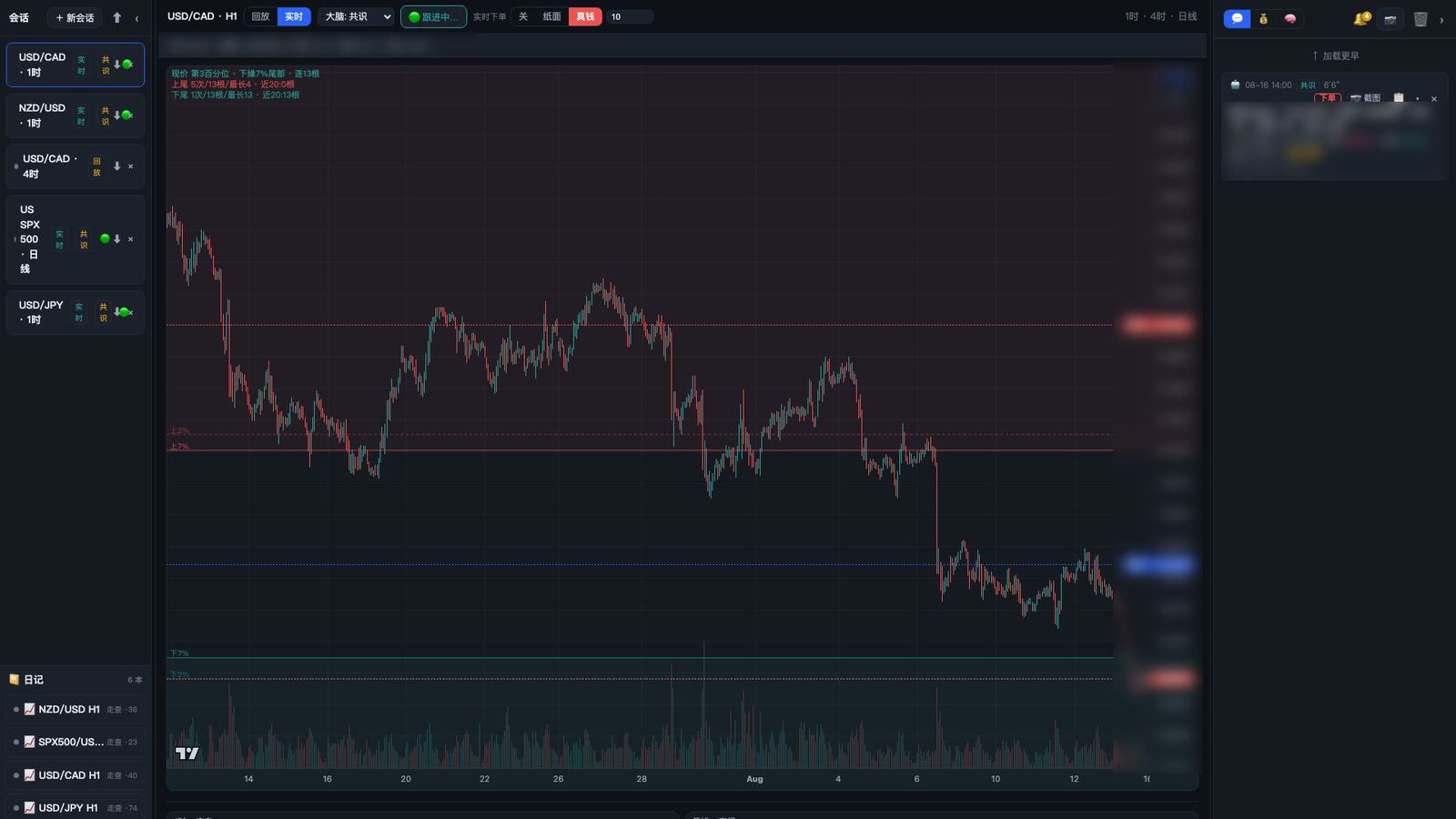
TradeLab
TradeLab

A trading workbench running on my own server, built around one rule: the model reasons, but it never decides. When a bar closes, TradeLab captures three timeframes, assembles the numeric context — volatility, regime, volume profile, multi-timeframe trend — and asks two independent AI models to write a thesis against a fixed strategy. What comes back is never an order. It is a proposal, and it has to clear a series of deterministic checks before any code is permitted to place it. Each thesis is recorded before the outcome is known, then scored against what price actually did. Self-hosted and single-user: the journals, the account connection and the strategy live on my own hardware rather than inside someone else’s product.

TWO MODELS THAT DISAGREE
A primary model writes the thesis; a second model with a completely separate context is handed the same charts plus the first answer and told to genuinely argue with it. The primary then reconciles, and the result carries an explicit consensus / no-consensus flag — disagreement is shown, not smoothed over.
THE AI CANNOT PLACE AN ORDER
It can only propose one. A thesis missing a trigger, stop, or target is automatically downgraded to neutral; what survives must then clear price-ordering sanity, a 1.5 minimum reward-to-risk, a stop of at least 2 ATR, a dynamic minimum risk distance, a higher-timeframe direction gate, and a confidence gate. Deterministic Python — not the model — makes the final call.
OFF / PAPER / LIVE
Live trading is off by default and armed per instrument. Paper mode logs the exact order it would have sent and sends nothing. Live places genuine bracket orders in micro size, with one position per direction, an accumulation cap, and auto-expiry on entries that never fill.
IT KEEPS WATCHING THE POSITION
A position steward walks every open trade and pending order on the account — including ones opened by hand in the broker’s own app — and applies break-even at 1 ATR, a time stop, a tighten-only trail, and repricing on stale entries. By design it only ever suggests: the buttons are yours to press.
REPLAY, ON THE SAME BRAIN
Step a session bar by bar through history and trade it manually, or run a walk-forward replay that calls the identical analysis pipeline at each checkpoint. Replay is not a degraded path — it thinks exactly as hard as live does, so what you learn in it transfers.
IT GRADES ITSELF
Every thesis is scored against what price actually did, per source, and that hit-rate is fed back into the next prompt so the model is told how reliable it has been. The trading rules carry the same treatment: the playbook annotates each rule with its measured outcome, and rules that keep losing get suspended.
CHARTS BUILT FOR THE METHOD
Three linked timeframes, volume profile with percentile bands, ATR and regime classification, automatic trend-line fitting, and support/resistance zones. The multi-timeframe context deliberately drops the still-forming higher bar so a replay checkpoint can never see the future.
JOURNALS THAT CLOSE THE LOOP
Thousands of analysis cards with their screenshots, each carrying the thesis and — once resolved — the outcome, entry, exit and R-multiple. Scheduled daily and weekly reviews read them back and label trades as strategy-aligned or improvised.
MARKETS
Forex, metals, indices and commodity CFDs trade end to end through the broker integration. US equities and China A-shares are wired for data, screening and an AI stock-picking journal with outcome verification — analysis and record-keeping, not order routing.
ENGINEERING
Python and FastAPI with ~96 endpoints and four background loops, a React and TypeScript workspace on TradingView charts, no database — everything is JSON on local disk. Order I/O sits behind a broker seam so the decision logic never knows which venue it is talking to.
RUN LONG ENOUGH TO HURT
Circuit breakers on a rate-limited model, self-healing when an agent session wedges, process recycling around a known file-descriptor leak, and a storage refactor prompted by measuring a 3.8 MB file being rewritten on every append. Several strategy rules cite the specific real-money trade that produced them.
open source · webexpand ▾collapse ▴
ChatPOC
A free AI tool that turns an idea into a working proof-of-concept through one conversation — requirements first, then runnable code.
020idea.com ↗

Most ideas die in the gap between "I can describe it" and "I can show it". chatPOC closes that gap: the site is the front door — you describe the idea and answer the questions the AI asks back — and behind it a pipeline drives multiple AI tools to produce a requirements document and a running prototype. Free, no account required. What the pipeline turns out is published on the open-source account below.

FRONT DOOR + PIPELINE
The conversation is the interface; the build is a pipeline. Requirements are clarified through dialogue and locked into a PRD, then the backend orchestrates multiple AI tools to generate the prototype — the same discipline as product work: requirements before code.
FREE, NO SIGN-UP
No registration, no account. The tool is MIT-licensed on GitHub.
LANGUAGES
English, Simplified and Traditional Chinese, Japanese, and French.
open source · githubexpand ▾collapse ▴
Open Source
The public home of my code — a growing, long-term maintained collection of prototypes and personal projects.
github.com/chatpoc-ai ↗

One account, kept deliberately: everything I publish lands here, and it is maintained for the long term rather than left to rot after a burst of activity. Today it holds the chatPOC tool, nineteen pipeline-built prototypes, and AgentMux — the first of my personal projects to move here, with more to follow as each is ready.

THE BREADTH
Nineteen TypeScript prototypes across wildly different domains — security monitoring, a quant trading platform, an offline-first education app, pathology QC, a card game, a VR gallery. The range is the point: the same workflow, whatever the domain.
LONG-TERM
New prototypes land as they are built, and the account is tended — READMEs, licenses, updates — the way production code is. An account you maintain says more than a repo you once pushed.
WHAT’S COMING
AgentMux is the pattern: personal projects move here as each one is ready, with the open-source decision made per project. This page and that account grow together.
App Storeexpand ▾collapse ▴
Emergency Binder
A secure, organized place for the documents your family may need in an emergency.
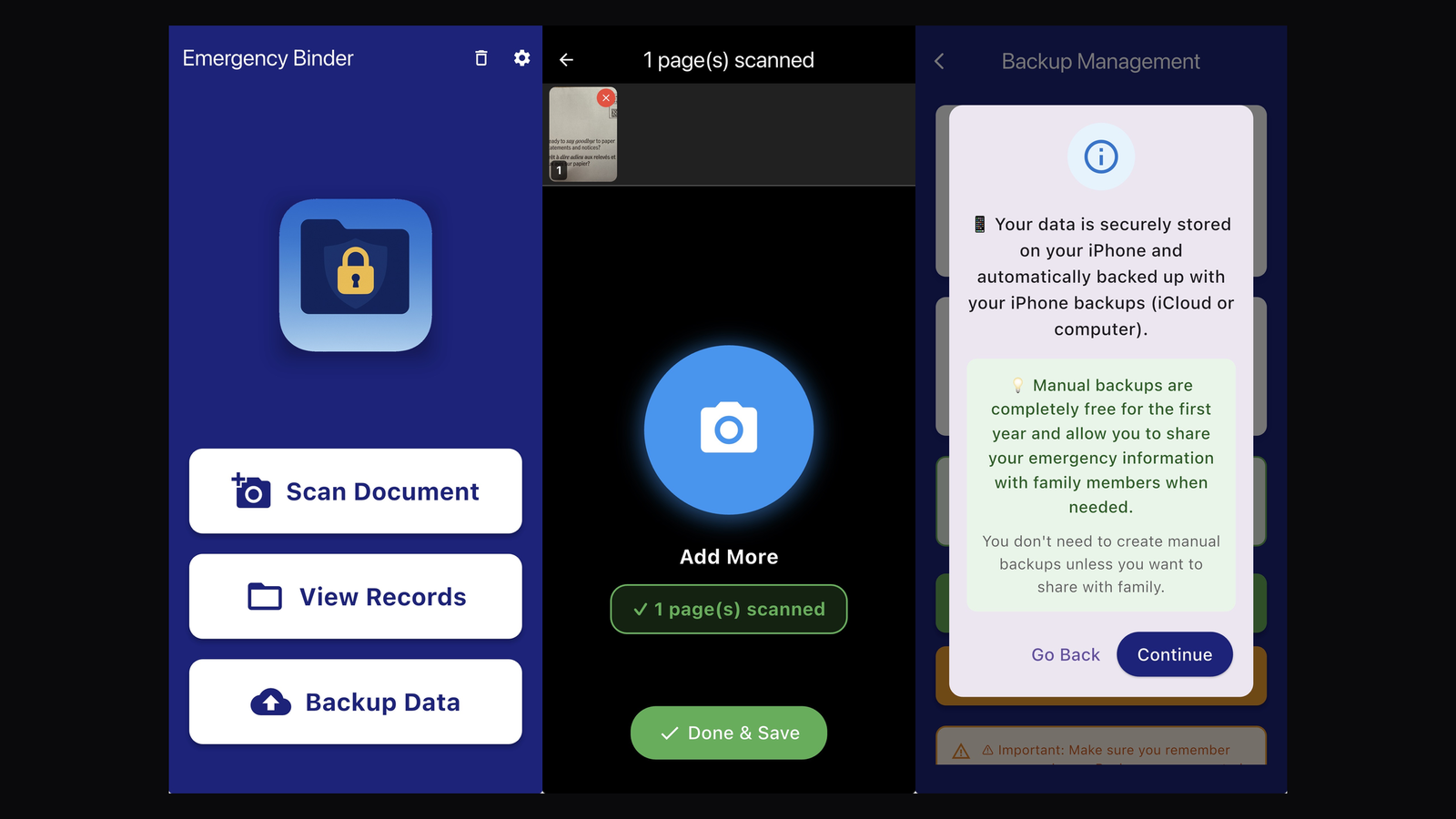
Emergency Binder
Emergency Binder
App Store ↗

Many older adults keep a physical binder — medical cards, insurance, key contacts — so family can act if they are suddenly hospitalized. But a paper binder grows heavy, is neither fireproof nor waterproof, and stays at home. Emergency Binder moves it onto the phone that is already in their pocket: photograph or dictate the important things, and the app keeps them encrypted, organized, and ready to hand to family when it matters.

DESIGNED FOR SENIORS
The home screen is exactly three oversized buttons — scan, view, back up. Text defaults to 120% and adjusts to 150%, and every major screen has built-in step-by-step help.
CAPTURE
Multi-page document scanning (up to 50 pages at a time), camera and photo-library import, voice dictation for descriptions, and voice memos attached to any record.
ENCRYPTION
Photos and recordings are encrypted with AES-256 before they are stored; the key lives in the iOS Keychain, and Face ID / Touch ID unlocks the app.
SECURITY PHRASE
Instead of a password, a memorable sentence — “For my beloved family 2025”. Case-insensitive, with an optional hint on the lock screen, so the people most likely to forget passwords can still get in.
FAMILY SHARING
Export an encrypted bundle through AirDrop, Messages, or Files. Family unlocks it with your phrase; once imported, it is re-encrypted under their own.
OFFLINE BY DESIGN
No servers, no accounts, no analytics — the app contains no networking code at all. Data rides along with the phone’s normal iCloud or computer backup.
ORGANIZE & RECOVER
Seven preset categories plus custom ones, search, per-record version history, and a recycle bin.
LANGUAGES
English, Simplified and Traditional Chinese, French, and Korean.
App Storeexpand ▾collapse ▴
Dual Cams
Two iPhone cameras recording at once — built for filming sports.
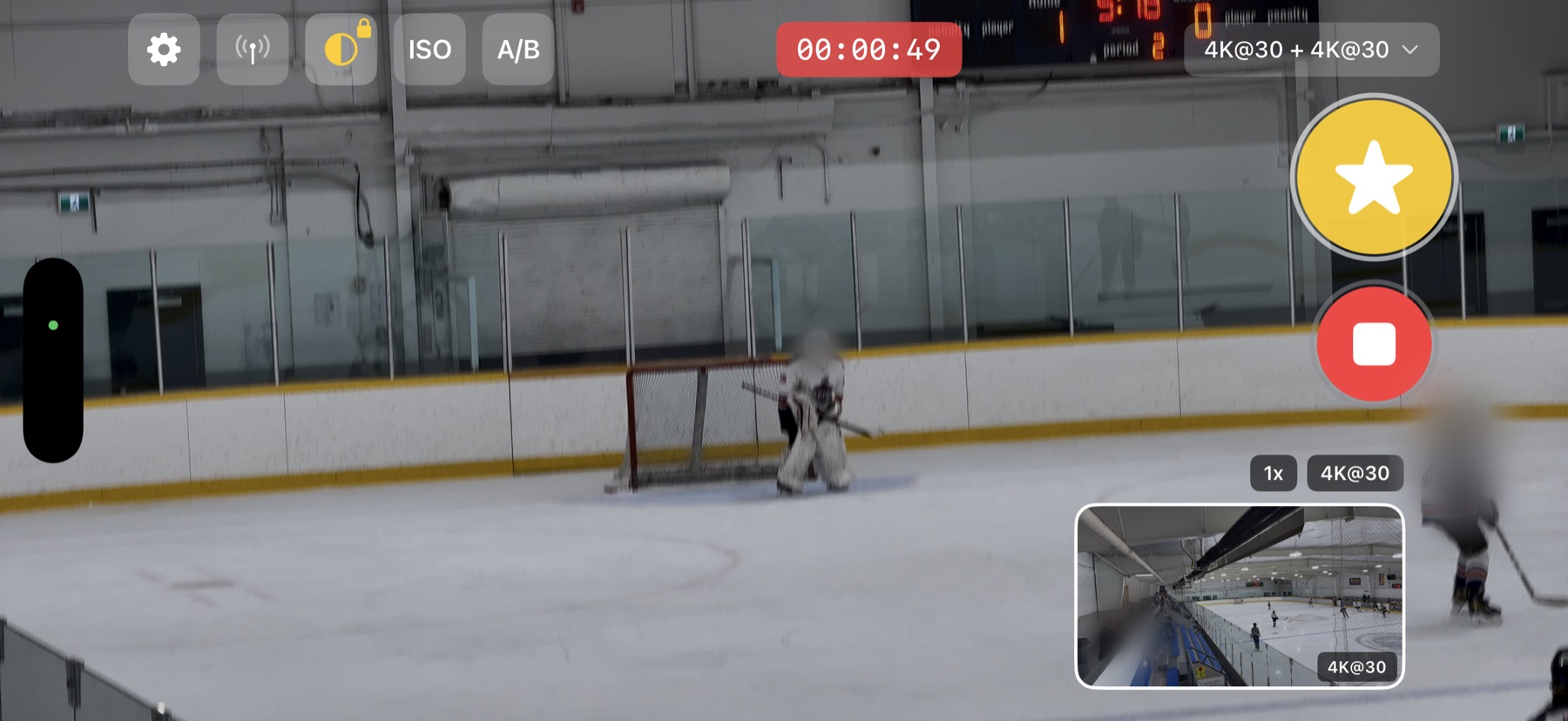
Dual Cams
Dual Cams
App Store ↗

One camera cannot tell the whole story of a hockey game: follow the play and you lose the goal, stay on the goal and you miss the build-up. Dual Cams records two iPhone cameras at once — wide on the play, telephoto locked on the net — and when something happens, one tap on the phone or the watch saves the last moments from both angles as finished clips. The whole rig: an iPhone on a gimbal on a tripod.

TWO CAMERAS AT ONCE
Any two of ultra-wide, wide, telephoto, and front — each with its own resolution (HD/4K) and frame rate. Every format pair is tested against the actual hardware before it is offered, because what a given iPhone can run two of is not something you want to discover mid-game.
THE GOAL BUTTON
One tap while recording marks a goal: both cameras keep rolling, and the last 5–120 seconds (your choice) are cut from each angle into finished clips. A second option marks a general highlight — the two are filed differently so a game’s goals stay separable from everything else worth keeping.
LOCKED WHITE BALANCE
Two lenses meter the same rink independently, so their auto white balance drifts apart and the angles refuse to match when you cut between them. Locking freezes the metered value; a sync toggle pushes the main camera’s setting onto the second, and a ±1500K nudge tunes both together.
LOCKED ISO
Arena lighting makes auto exposure hunt in the middle of a play. Locking captures the current ISO and holds it. When synced across both cameras the value is re-clamped into the second lens’s own range — an ultra-wide and a telephoto do not share the same ceiling.
A/B PRESETS
Store two zoom factors — or two focus points — per camera, then flick the preview up or down to jump between them without looking away from the game. Works mid-recording, set independently for each camera, and remembered between sessions.
APPLE WATCH REMOTE
Start and stop, mark goals, snap photos, and step the zoom from the wrist — the phone never leaves the tripod.
IN BOTH LIBRARIES AT ONCE
Clips are written into the system photo library and a DualCams album in the same operation — one asset, filed in both — with goals additionally collected in their own album. The app’s library reads them back with a green ball on goals and a yellow star on other highlights, so nothing has to be exported to be found.
ANGLE EDITOR
Set markers on a pair and the editor cuts wide → telephoto → wide, each segment at its own speed from 0.25× replay to 4×, with a full preview before export. A separate batch merge takes the tail of every selected clip and staples a whole game into one reel, picture-in-picture layouts included.
NEXT RELEASE · YOUTUBE
Coming in the next release: sign in to a YouTube account and send clips up in resumable chunks, sorted into a per-month playlist, unlisted by default and Wi-Fi-only unless you say otherwise. Each angle uploads as its own video; merge first if you want one.
RIG INTEGRATION
Bluetooth control of an OpenScope pan-tilt gimbal from inside the app — the tripod rig this was built around.
HARDENED BY USE
The details only a real season produces. The marker button is larger than the record button, because during a game you press it far more often, with cold hands, without looking down. Marking a goal waits for both outputs to settle and retries before restarting — an earlier version sometimes resumed only one camera. A recording interrupted by an incoming call is stopped and saved rather than lost. And casting a game to a TV turned out to break how iOS reports orientation, which is not a bug anyone finds from a desk.
ENGINEERING
100% native Swift and SwiftUI on AVFoundation’s multi-cam session, zero third-party dependencies; HEVC and HDR preserved end to end; ten languages.
beta
Cheque Snap
Fill out a personal cheque on your phone, then print it onto a physical cheque with precise alignment.
beta
RouteTracer
A driving-practice companion that follows test routes and gives new drivers examiner-style prompts.
+
More projects in progress
*.brogu.ca
STACK
CURRENT FOCUS Applied AILLM IntegrationAI-enabled DevelopmentCursorClaudeCodexReactPythonC#API Design
LONG-TERM .NETPHPDelphiC/UnixSQL / DB2AWSAzure
STRENGTHS Legacy-to-ModernPrototype-to-ProductionSystems IntegrationWorkflow Automation
LANGUAGES English — full professional · French — written business · Chinese — native
Let’s connect.
Open to consulting conversations and difficult, worthwhile problems. Leave a message and I’ll reply.

Your message goes straight to my inbox. Nothing is stored on this site.